
Automated alerts and the property market: an investor’s guide
Automated valuation and portfolio alerts give property investors rolling quarterly valuations, portfolio-level equity signals and borrowing-power changes, so decisions get made on current numbers instead of a guess from last year’s sale prices. That’s the role these alerts play in the property market: they compress the gap between “something changed” and “you found out about it.”
Platforms like Wealthstacker generate these alerts by running automated valuation models (AVMs) against a property or portfolio every quarter, flagging shifts in equity, confidence, or borrowing capacity as they happen. The trade-off is accuracy: leading residential AVMs report median error rates in the low single digits in liquid, well-comped markets, but that error widens fast on unique or thinly-traded properties.
What an alert typically tells you, in one glance:
- Your estimated equity moved by a set percentage over the quarter
- The model’s confidence score dropped, meaning the number is less reliable right now
- Your borrowing power shifted enough to change what you could buy next
Key Takeaways
Automated alerts work because they replace manual, infrequent valuation checks with quarterly, threshold-based signals that flag equity, borrowing-power, and confidence changes as they happen.
| Point | Details |
|---|---|
| Alerts cover valuation, not listings | This guide’s alerts track your equity, portfolio and borrowing power, not new property listings. |
| Accuracy varies by liquidity | Median AVM errors sit around 2–5% in liquid markets, wider on unique or thin-comp properties. |
| Confidence scores matter more than estimates | A low confidence score means investigate before acting, regardless of the headline number. |
| Thresholds should match your situation | Templates like a 5% equity shift or 10% borrowing-power drop work as a starting point, not a fixed rule. |
| Wealthstacker offers free quarterly monitoring | Its toolkit provides free automated valuations, portfolio dashboards, and borrowing-power flags, with premium scenario modelling as an upgrade. |
Table of Contents
- What is the role of automated alerts in the property market?
- Why do automated valuation and portfolio alerts matter for investors?
- How are automated alerts generated behind the scenes?
- How do you set alert thresholds that actually work?
- How accurate are automated property alerts, really?
- What should you check before choosing an alert toolkit?
- Are there compliance rules around automated property alerts?
- How do automated alerts fit with other tools you already use?
- What do real investor decisions triggered by alerts look like?
- How can WealthStacker help you act on these alerts?
- Sources
What is the role of automated alerts in the property market?
The role of automated alerts in the property market, as covered here, is narrow and specific: they track your own valuation, portfolio equity, and borrowing capacity, not new listings or agent notifications. That distinction matters because most search results conflate the two.
This guide covers automated valuation and investment alerts: quarterly valuation updates, portfolio-level equity changes, borrowing-power flags, and stress signals across a holding. It does not cover listing alerts, saved-search notifications, or agent-side lead alerts, which solve a different problem for a different audience.
The alert categories worth understanding before you set anything up:
- Valuation shift alerts — your estimated value moved beyond a set threshold since the last quarter
- Confidence change alerts — the model’s certainty in its own number dropped or improved
- Rent and occupancy triggers — yield assumptions no longer match what the property is actually earning
- Refinance opportunity flags — equity or rate movement opens a refinancing window worth reviewing
Pro Tip: Set up separate alert profiles for owner-occupied and investment properties. The thresholds that matter for a home you live in are different from the ones that matter for a rental you’re actively managing for yield.
Why do automated valuation and portfolio alerts matter for investors?
The practical value comes down to timing. An alert that tells you your equity crossed a refinancing threshold in week two of a quarter, rather than when you happen to check your loan statement in month four, is the difference between acting on a rate window and missing it.
Continuous or near-continuous valuation tracking can catch material changes weeks before a formal appraisal would surface them — a tenant giving notice, a local cap-rate shift, a sudden run of comparable sales. For an individual investor, that translates into three real scenarios:
- A rentvestor tracking equity growth in their owned property gets an alert that their deposit-ready equity crossed a threshold, months before they’d have manually recalculated it.
- A single-property investor gets a borrowing-power flag showing a refinance window has opened after a rate cut, prompting a call to their lender that quarter instead of the next.
- A multi-property owner spots one regional asset drifting away from the rest of the portfolio’s growth curve and investigates before it drags down the group’s overall return.
The measurable payoff sits in a few places:
- Faster decisions, because you’re reacting to a flag instead of a manual recheck
- Fewer missed refinance windows, since borrowing-power changes surface as they happen
- Better portfolio-level tracking, because drift in one asset shows up against the group average rather than in isolation
How are automated alerts generated behind the scenes?
Alerts are the output end of a data pipeline, and understanding that pipeline helps you judge when to trust a number and when to question it. Modern AVMs pull in far more than recent sale prices: permit filings, infrastructure project data, and demographic shifts all feed into the model, alongside the more obvious inputs like comparable sales and rent rolls. Some newer models go further, using computer vision to read renovation quality from photos and language models to extract detail from listing text that a basic AVM would miss entirely.
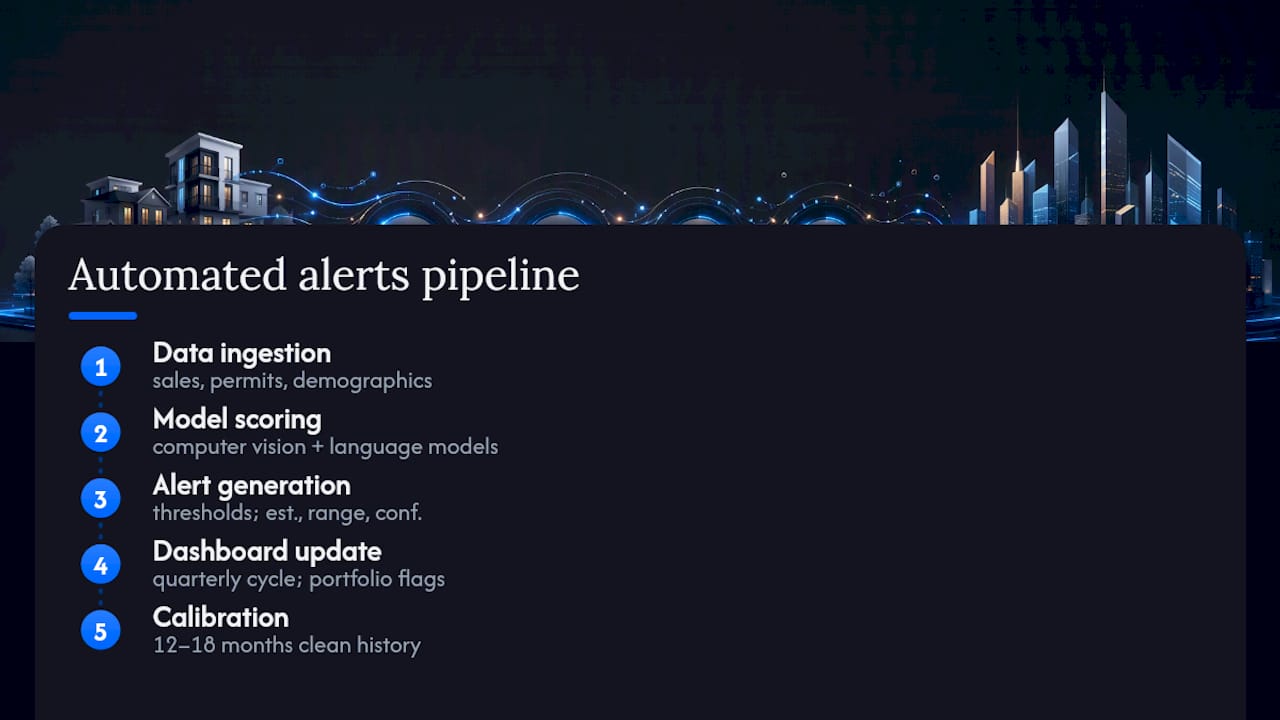
The output you actually see has three parts: an estimate, a value range, and a confidence score. That confidence score is the part most investors skip past, and it’s the part that matters most. A high score means the model had dense, recent comparable data to work with. A low score means it’s extrapolating from thin or stale data, and the number deserves a second look before you act on it.
The cadence matters too. Wealthstacker runs core valuations on a rolling quarterly cycle, with portfolio-level flags able to surface sooner when a change is significant enough to warrant it. The data flow, in short: ingestion of comps and property data, model scoring, alert generation against your thresholds, and a dashboard update you can check whenever suits you. Building that model reliably requires 12 to 18 months of clean historical data to calibrate properly, which is one reason newer or unusual assets tend to show wider ranges than established, well-traded ones.
How do you set alert thresholds that actually work?
Generic thresholds waste your attention. A threshold tuned to your situation, your loan structure and your risk tolerance is what turns an alert from noise into a decision prompt.
Start with templates and adjust from there:
- Equity shift alert: trigger at a movement of more than 5% in a 90-day window
- Confidence score alert: trigger when the model’s confidence drops below 70%
- Borrowing-power alert: trigger on a decline of more than 10%, since this affects what you can act on next
- Rent-yield alert: trigger when actual rent diverges from modelled yield by a set margin
Once an alert fires, the value comes from what happens next, not the notification itself. A workable process looks like this:
- Receive the alert and note which threshold triggered it and by how much.
- Cross-check the number against at least one other source, whether that’s a second AVM, a recent local sale, or your agent’s read on the street.
- Weigh the confidence score. A high-confidence alert on a big move deserves quick action; a low-confidence alert deserves a closer look before you do anything.
- Decide the outcome: ignore it as noise, investigate further, consider listing, or start a refinance conversation.
- Log the decision, even if the decision was to do nothing. That record makes the next quarter’s alert easier to interpret.
The most useful alerts are the ones designed to map to one clear action with a specific next step and a person responsible for following it up, rather than a generic “something changed” ping.
Pro Tip: Widen your thresholds on unique or one-off properties, like a heavily renovated home or a rural block, where comparable sales are thin. Tight thresholds on a property the model struggles to comp accurately will just generate false alarms.
How accurate are automated property alerts, really?
Accuracy depends entirely on how much good comparable data the model has to work with. In liquid, homogeneous markets, median AVM errors sit in the low single digits, often in a range of roughly 2 to 5%. That’s tight enough to trust for most monitoring purposes. On a unique property, or one in a thin market, that error band widens considerably, and the model’s own confidence score should reflect that.
A few failure modes show up repeatedly:
- Data lag — a recent renovation or a just-settled comparable sale hasn’t made it into the model yet
- Misread renovations — the model sees a bathroom upgrade but can’t fully price the quality of the work
- Postcode heterogeneity — one suburb boundary hides wildly different property types, dragging the average off for any individual home
- Model overconfidence — a tight range presented with unwarranted certainty when the underlying data is actually sparse
The fix is procedural, not technical. Cross-check at least three AVM outputs rather than trusting one, physically inspect comparable sales where you can, and always weight the confidence score alongside the estimate itself. Treat every alert as a flag worth investigating, not a verdict to act on blind.
What should you check before choosing an alert toolkit?
Not every toolkit handles data, privacy or pricing the same way, and the differences matter more than the marketing copy suggests.
| What to check | Why it matters |
|---|---|
| Accuracy transparency | Look for stated confidence scores and error ranges, not just a single number. |
| Data sources disclosed | Comps, permits, and rent data quality directly affects alert reliability. |
| Refresh cadence | Quarterly valuations with intraday portfolio flags catch changes faster than annual-only tools. |
| Export and integration | Check whether data exports to a spreadsheet or connects with other tools you already use. |
| Data and privacy practices | Ask what property and financial data is stored, and how it’s retained or deleted. |
On privacy specifically, ask any provider what data they need to generate a valuation (typically address, purchase price, and loan details), whether that data is linked to your identity beyond the app, and what their retention policy looks like if you close your account.
Most toolkits, Wealthstacker included, run on a freemium model: core valuations and portfolio tracking are free, while advanced scenario modelling, 15-year forecasting, or premium alert customisation sit behind a paid upgrade. The ROI calculation is simple enough to do yourself: weigh the subscription cost against one missed refinance window or one bad decision the alert would have flagged early.
Are there compliance rules around automated property alerts?
Automated valuations sit outside the formal bank-valuation and appraisal process, and that distinction has real regulatory weight. A lender’s own valuation, used to approve a loan, is a separate and more heavily regulated process than a toolkit’s AVM-based estimate. Nothing in this guide, and no alert from any toolkit, replaces that formal valuation when you’re actually applying for finance.
Where compliance does matter for individual investors is data handling. Any toolkit generating valuations and alerts from your property and financial details is handling personal financial data, and in Australia that falls under the Privacy Act’s obligations around collection, storage and disclosure. Before linking any account or entering loan details into a toolkit, check what the provider’s privacy policy actually says about data sharing with third parties, particularly lenders, and whether you can request deletion.
If a toolkit’s borrowing-power estimate feeds into an actual loan referral or introduction to a lender, that referral pathway typically involves its own disclosure obligations, separate from the alert itself. Read the fine print on any “estimate your borrowing power” feature to understand whether it’s a rough model or a real credit assessment. The safest approach: treat every automated alert, valuation, or borrowing estimate as a decision-support signal, and confirm anything material, refinancing, selling, or borrowing more, through a licensed broker, lender, or valuer before committing.
How do automated alerts fit with other tools you already use?
Few investors run on a single tool, and alerts are most useful when they slot into a workflow you already have rather than becoming another dashboard to check.
Spreadsheet exports remain the most common bridge. A toolkit that lets you export quarterly valuations and alert history into a spreadsheet means you can layer your own portfolio benchmarking on top, tracking growth against your own targets rather than just the raw alert feed.
For investors managing several properties as a semi-professional operation, integration with property management or CRM software matters more. If you’re comparing portfolio tracking tools against agency-grade software, the key question is whether valuation alerts can sit alongside tenancy and maintenance records, or whether you’re stuck manually cross-referencing two systems.
Investment dashboards are the third integration point, and arguably the most useful for rentvestors modelling multiple scenarios. An alert that flags an equity shift is far more actionable when it automatically updates a 15-year wealth projection, rather than requiring you to manually plug the new number into a separate model. That’s the practical case for keeping valuation, alerts, and scenario modelling inside one connected toolkit instead of stitching together three separate apps.
What do real investor decisions triggered by alerts look like?
The theory matters less than what happens when an alert actually lands in someone’s inbox. Without the alert, that equity might have sat unused for another year until a routine check turned it up.
A single-property owner refinancing on a fixed rate might get a borrowing-power flag the month rates move, showing their capacity has improved enough to justify a broker conversation about switching lenders. The alert doesn’t make the decision. It just puts the option in front of them at the moment it’s relevant, rather than three months later when the rate window has shifted again.

A portfolio holder with properties across two states might notice one asset’s confidence score drop sharply after an alert, prompting them to check local listings and discover a large new supply of comparable stock had just hit the market, explaining the model’s reduced certainty. That’s a case where the alert wasn’t wrong. It was accurately reporting that the ground had shifted, and the investigation step confirmed why, rather than the investor either overreacting or ignoring a real signal.
How can WealthStacker help you act on these alerts?
Reading about alert thresholds is one thing. Actually having a system that generates them without a subscription fee is another. Wealthstacker runs free automated quarterly valuations on your property or portfolio, paired with a dashboard that tracks equity, borrowing power, and confidence scores over time, so the workflow described throughout this guide isn’t something you have to build yourself.
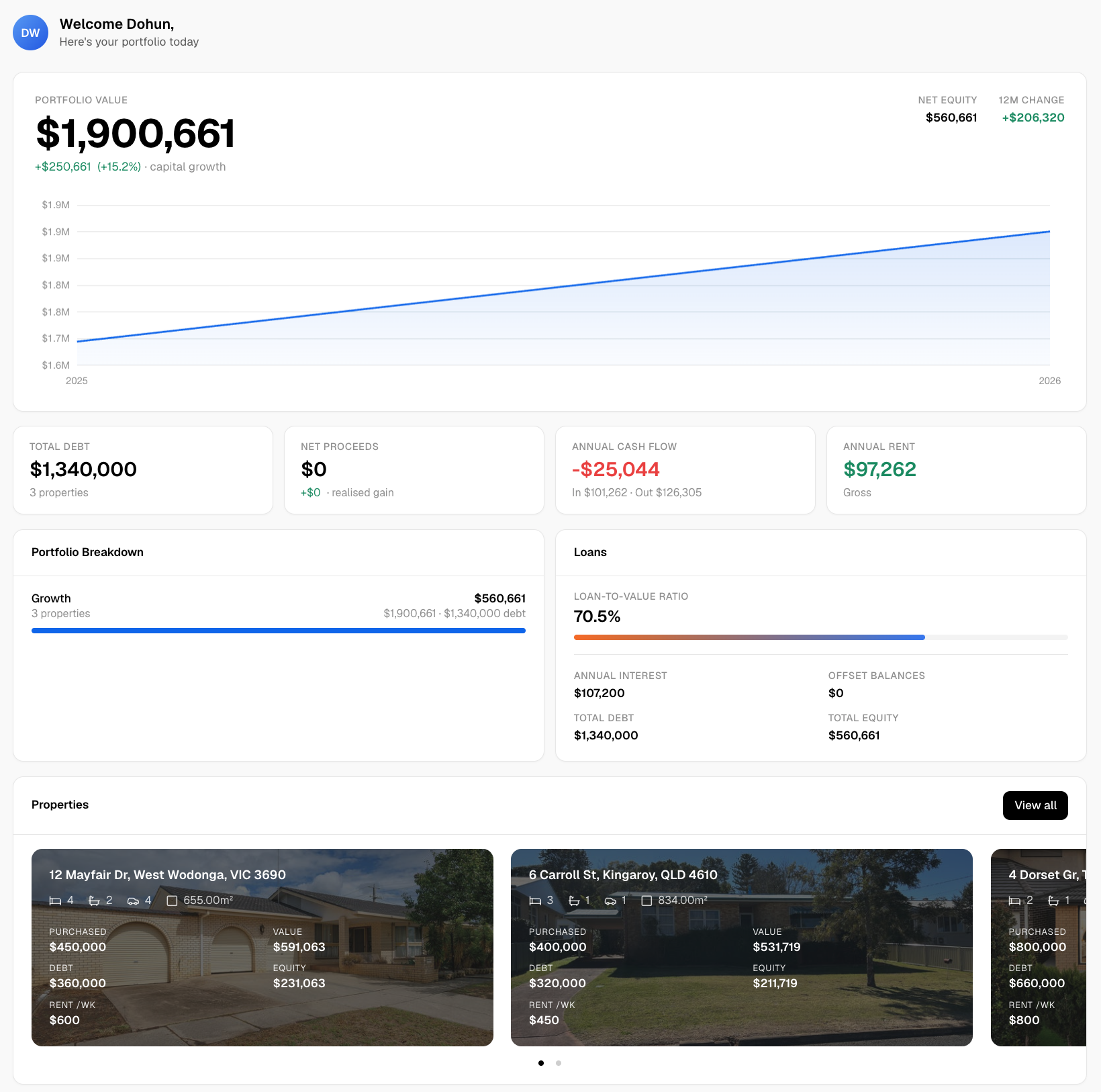
The core toolkit maps directly onto what’s covered here: quarterly valuations that feed into portfolio-level tracking, borrowing-power flags when your capacity shifts, and scenario modelling for comparing a rentvesting strategy against buying outright over a 15-year horizon. Advanced modelling and deeper scenario customisation sit behind a premium upgrade, but the core valuation and alert features stay free, which matters if you’re still deciding whether this kind of monitoring earns its place in your routine.
For readers wanting more detail on how the underlying models work, Wealthstacker’s own guidance on automated valuation models and its blog resources walk through the mechanics in plain language. Head to the Wealthstacker property investment toolkit to run a free valuation on your own property and see what a live alert dashboard actually looks like before deciding whether the premium tier is worth it.
Sources
- AI Real Estate Investment Analysis | AiGentsRealty
- AI for Real Estate: The Operator’s ROI Guide (2026) | Tommaso Maria Ricci
- AI for Real Estate Fund Management — Analytics and Reporting | Madgeek
This article is general information, not a substitute for advice from a qualified financial advisor. Consult a qualified financial professional about your own circumstances before acting on anything here.